
User sessions
When a user signs in to an application through TrustBuilder, TrustBuilder creates a session for that user.
A TrustBuilder session represents the authenticated user and can be shared across multiple applications integrated with the same TrustBuilder tenant. As long as the session remains active, the user can access participating applications without being prompted to authenticate again, depending on the application's authentication policy.
The session ends when it expires (1hour) or when the user signs out.
Single Logout (SLO)
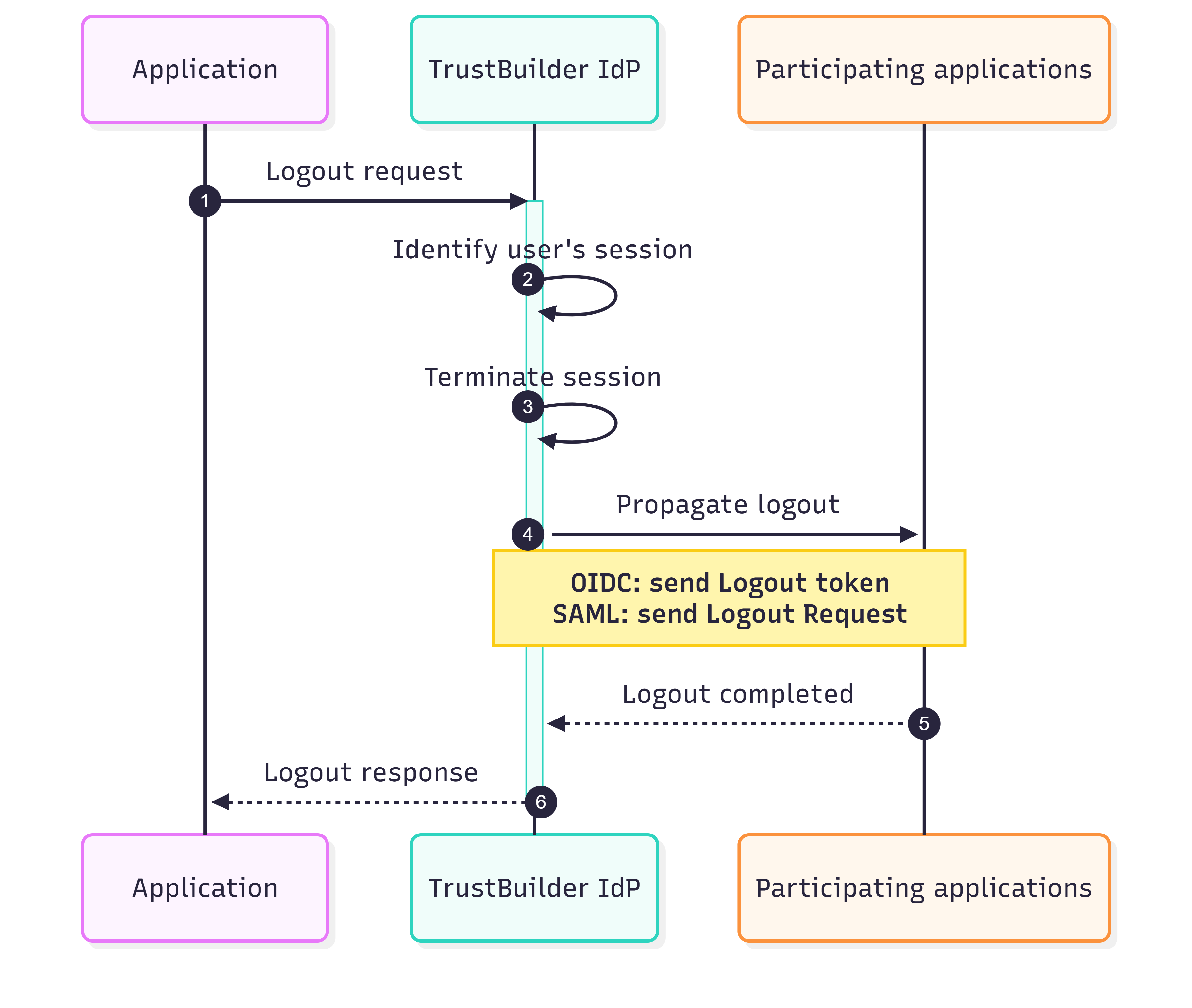
Single Logout (SLO) allows a user to terminate a TrustBuilder session by signing out from a single application. When a logout is initiated, TrustBuilder ends the user's session and propagates the logout to every participating application that shares the same session.
-
When a user signs out from an application, the application sends a logout request to TrustBuilder to initiate the Single Logout process.
For SAML applications, the Logout Request must be signed using the Service Provider's signing certificate configured in the SP metadata. Unsigned or invalid requests are rejected.
-
TrustBuilder identifies the user's session using information provided in the logout request:
-
for OIDC →
id_token_hintwith thesubandsidclaims,
or -
for SAML →
NameIDandSessionIndexvalues.
If the required information is missing or invalid, the logout cannot be propagated.
-
-
Once the session has been identified, TrustBuilder terminates the user's session.
-
TrustBuilder identifies all applications associated with the terminated session and propagates the logout.
The propagation mechanism depends on the protocol used by each participating application:-
for OIDC participating applications: Trustbuilder sends a Logout Token to their configured Backchannel logout endpoint. If the endpoint is not configured, TrustBuilder revokes the tokens.
-
for SAML participating applications : TrustBuilder sends a signed SAML Logout Request to their configured Single Logout endpoint.
-
-
Participating applications process the logout action and terminate their local user session. They return a signed LogoutResponse (SAML) or a HTTP response (OIDC) to TrustBuilder.
-
TrustBuilder returns a response to the application that initiated the logout, indicating whether the operation completed successfully.