
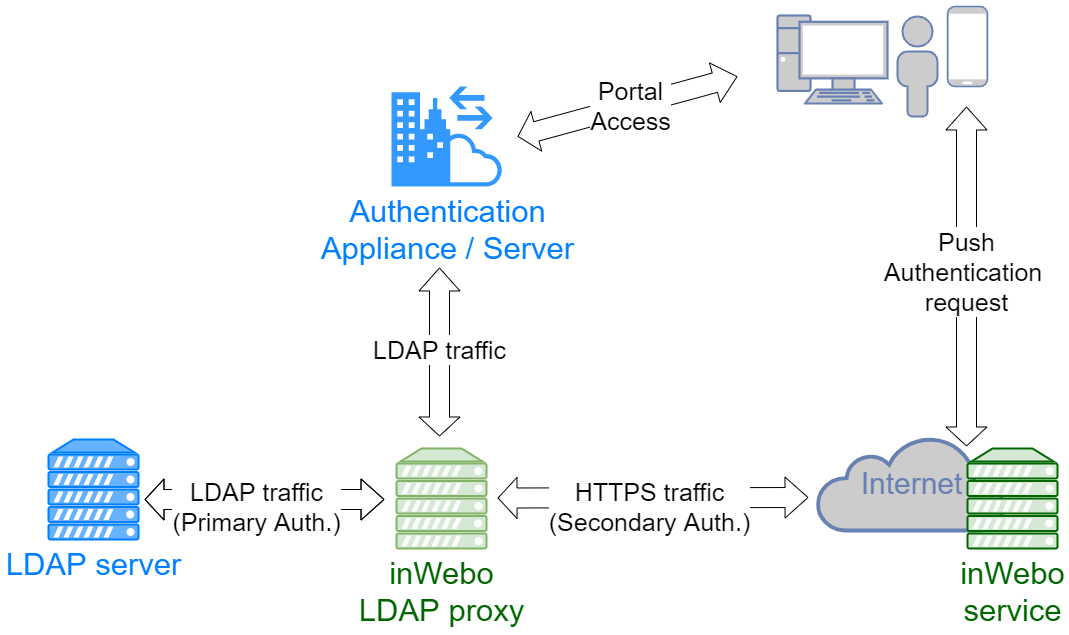
The TrustBuilder MFA LDAP Proxy (formerly inWebo LDAP Proxy) enables you to add strong authentication to an existing LDAP authentication flow.
It acts as an intermediary between the client and the LDAP server by forwarding LDAP authentication requests. When the LDAP server successfully validates a Bind request, the LDAP Proxy sends an MFA authentication request to the TrustBuilder MFA service. The user is identified using the configured LDAP attribute and is prompted to authenticate on their previously registered device.
If the MFA authentication is successful, the LDAP Proxy completes the Bind request and the user is authenticated.
Prerequisites
-
Infrastructure - The server hosting the proxy must have:
-
Access to the LDAP server that will be connected to the TrustBuilder proxy
-
Internet access to reach the TrustBuilder MFA API
-
-
Software:
-
Windows or Linux (64-bit)
-
Java 8 (64 bits) for the version without JRE or OpenJDK 8 (64 bits)
-
Install the LDAP Proxy
Install the LDAP Proxy on a server that can communicate with both your LDAP server and the TrustBuilder MFA service.
Linux
-
Extract the archive.
-
Copy
config/config_to_be_completed.propertiestoconfig/config.properties. -
Configure the
config.propertiesfile as described in the next section. -
Start the proxy.
-
for version using the JRE installed on the system:
bin/run.sh -
for version using built-in JRE:
bin/run_standalone.sh
-
Others installation options:
Windows
-
Extract the archive.
-
Copy
config/config_to_be_completed.propertiestoconfig/config.properties. -
Configure the
config.propertiesfile as described in the next section. -
Start the proxy:
-
Version using the JRE installed on the system:
bin/run.bat -
Version using the built-in JRE:
bin/run_standalone.bat
-
Others installation options:
Configure the LDAP Proxy
The main components and their configuration items you need to modify in config.properties file.
LDAP Proxy settings
Configure how the proxy listens for incoming LDAP requests and connects to the backend LDAP server.
|
Parameter |
Description |
|---|---|
|
|
IP address or Name of the LDAP server to send the request to. LDAPServ.domain.test |
|
|
Port of the backend LDAP server 389 for LDAP or 636 for LDAPS |
|
|
Port used by the LDAP Proxy to listen for client connections Usually 389 |
TrustBuilder MFA (inwebo) settings
Configure the connection between the LDAP Proxy and the TrustBuilder MFA service.
|
Parameter |
Description |
|---|---|
|
|
TrustBuilder MFA service identifier |
|
|
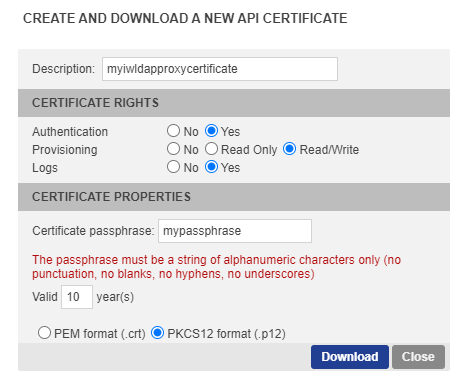
Path to the downloaded .p12 certificate How to download a .P12 certificate
|
|
|
Passphrase associated with the certificate |
|
|
LDAP attribute used to map the authenticated LDAP user with the corresponding user login in TrustBuilder MFA.
|
LDAP login resolution new
By default, the LDAP Proxy expects clients to authenticate using a Distinguished Name (DN).
When clients authenticate using another identifier format, such as sAMAccountName or userPrincipalName (UPN), the LDAP Proxy performs an LDAP search to retrieve the corresponding user entry before forwarding the authentication request.
To enable this, configure the following parameters:
|
Parameter |
Description |
|---|---|
|
|
LDAP attribute used to identify the user during the search. Examples:
|
|
|
Service account used to perform LDAP searches |
|
|
Password of the service account |
Whitelist the service account
Accounts listed in ldap.proxy.whitelist.dn bypass MFA when authenticating through the LDAP Proxy. This is typically used for service accounts performing LDAP queries or application binds.
Example
ldap.proxy.whitelist.dn=CN=ReadOnly,CN=Users,DC=domain,DC=testThis profile will be used as credentials with the LDAP and should not trigger TrustBuilder MFA push authentication each time you send a request to the LDAP server.
Configure your LDAP client
Once the LDAP Proxy is configured, update your LDAP client to send authentication requests to the TrustBuilder LDAP Proxy instead of directly to the LDAP server.
Replace the LDAP server connection settings with those of the LDAP Proxy.
If your application already has an LDAP configuration, you can usually duplicate it and replace only the server address and port with those of the LDAP Proxy.
|
Parameter |
Value |
|---|---|
|
LDAP server address |
LDAP Proxy IP address |
|
LDAP port |
The LDAP proxy service number (as indicated previously |
|
Base DN |
The Base DN of the LDAP server
|
|
Bind DN |
The LDAP credentials DN (as used previously ldap.proxy.whitelist.dn)
|
|
Bind password |
Password associated with the Bind DN |
Validate the LDAP Proxy configuration
Run the following command line to check if the LDAP configuration and the Bind command are successful:
run_standalone -validateConfiguration <DN>
For Linux and Windows
Example:
run_standalone -validateConfiguration CN=Administrator,CN=Users,DC=Domain,DC=test
Testing LDAP Proxy authentication
Run the following command line to test the push Authentication of a TrustBuilder MFA login for your service; See if you are correctly notified with the current configuration (serviceID, Certificate, Passphrase).
run_standalone -doPush <login_trustbuilder>
For Linux and Windows
Advanced configuration for LDAP Proxy
In the LDAP proxy configuration, you can set additional parameters.
Need help?
If you need assistance configuring these advanced parameters, contact the TrustBuilder support team.
TLS configuration
Use these parameters to specify the TLS protocol version used by the LDAP Proxy.
-
For sending requests to the LDAP proxy:
ldap.proxy.cipher.protocol -
When forwarding the request to the LDAP:
proxy.cipher.protocol
Possible values:
-
Automatic choice of JVM:
TLS -
Protocol TLS v1:
TLSv1 -
Protocol TLS v1.1:
TLSv1.1 -
Protocol TLS v1.2:
TLSv1.2 -
Protocol TLS v1.3:
TLSv1.3
Whenever possible, configure both parameters to use the latest supported TLS version.
ldap.proxy.cipher.protocol=TLSv1.3
proxy.cipher.protocol=TLSv1.3
Timeouts
You can set timeout values for requests
-
For the Request timeout between the LDAP proxy and the LDAP server
Value in ms. Default 0 ( no timeout )
Setting: ldap.proxy.request.timeoutIf a response is not received from the Directory Server within the timeout period, then the operation will be abandoned and an Exception error result returned.
A timeout setting of 0 disables operation timeout limits -
For the Request timeout between the LDAP client and the LDAP proxy
Value in ms. Default 10000 ( 10sc )
Setting: ldap.proxy.connect.timeoutIf a connection is not established within the timeout period (incl. SSL negotiation, initial bind request, and/or heart-beat), then an Exception error result will be returned.
The default operation timeout is 10 seconds and a timeout setting of 0 causes the OS connect timeout to be used. -
When the timeout value is exceeded
An error is returned when the connection failed
"Authentication to LDAP failed : < information>"The error is logged in the LDAP Proxy log file
Performance
To configure the number of threads allowed by the proxy LDAP app
-
ldap.proxy.selector.thread.count :
The number of simultaneous request that the LDAP proxy can perform. The default value is depending of the hardware (It's the maximum between 2 and the available processors / 2 )
To configure simultaneous push requests
-
ldap.proxy.max.simultaneous.push
The maximum number of simultaneous push requests that can handle the LDAP proxy. This value must be greater than or equal to 1. The default value is 100.
To configure the HTTP connection pool
-
inwebo.client.http.timeout : (the default value is 30 seconds)
Read timeout interval and connect timeout interval, in milliseconds. A value of zero 0 is equivalent to an interval of infinity. -
inwebo.pool.http.max.total : (the default value is 100)
The maximum number of connections allowed across all HTTP routes. -
inwebo.pool.http.default.max.per.route : (the default value is 40)
The maximum number of connections allowed for a HTTP route.
Microsoft Active Directory group configuration
If you wish to activate inWebo MFA only for a subset of your Microsoft Active Directory users (a.k.a. group) you must use either of these group configurations.
Both are valid because MS AD provide by default both group configurations. Choose the one which is the more suitable for you.
# sAMAccountName is typically use for AD, other possibility is cn
# This will be matched with the user “login” (mandatory today) field within inWebo tenant
# to be noted, ldapproxy default (uid) will not work with MS AD
ldap.proxy.login.attribute=sAMAccountName
# group DN for which members will be required to authenticate with inWebo (other users will not use MFA)
# /!\ Change value
ldap.proxy.do.step.up.group.base.dn=CN=<inWebo_group>,DC=<domain>,DC=<tld>
# Choose group membership within the user attributes, with memberOf attribute
ldap.proxy.do.step.up.by.type=user
# LDAP attribute for user memberOf
ldap.proxy.do.step.up.lookup.ismemberof.attribute=memberOf
or
Note here that there is an additional mandatory setting ldap.proxy.do.step.up.filter.group.object.class=group
# sAMAccountName is typically use for AD, other possibility is cn
# This will be matched with the user “login” (mandatory today) field within inWebo tenant
# to be noted, ldapproxy default (uid) will not work with MS AD
ldap.proxy.login.attribute=sAMAccountName
# group DN for which members will be required to authenticate with inWebo (other users will not use MFA)
# /!\ Change value
ldap.proxy.do.step.up.group.base.dn=CN=<inWebo_group>,DC=<domain>,DC=<tld>
# Choose group membership with group DN entry
ldap.proxy.do.step.up.by.type=group
# LDAP attribute for group members within the DN group entry
ldap.proxy.do.step.up.lookup.member.attribute=member
# LDAP objectClass attribute used to define a group within MS AD
# to be noted, ldapproxy default (group) will not work with MS AD
ldap.proxy.do.step.up.filter.group.object.class=group