
|
Incident Status Report
Current Status
Workaround: Fix Release Plan |
What is the issue?
When starting Authenticator, an error is displayed showing “A Javascript error occurred in the main process”. After this error, the application does not receive notifications.
Note: only the notifications are impacted. The application is still functional and authentication requests can be viewed and processed using the “pending operations” button.
Who is impacted?
The issue is happening randomly to users running Authenticator for Windows, Linux or macOS. It is unfrequent but affects potentially any version of Authenticator, from 6.x to the latest version.
Root Cause
The root cause is identified. It is located in the communication between the application and the notification service (Firebase).
Fix
A fix is implemented and included in version 7.10.1 for Linux, version 7.10.2 for Windows. Once the application is upgraded, the issue is solved.
Current Workarounds
WORKAROUND 1
The user ignores the issue and continues:
-
Ignore the startup error pop-up
-
Click on Pending operation to manually retrieve and approve an authentication request.
WORKAROUND 2
The user resets a file - the issue is solved on this workstation.
-
Quit Trustbuilder Authenticator app.
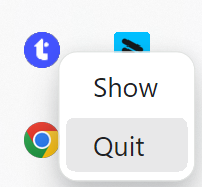
-
Delete
config.jsonfrom the folder below:
(replace[UserName]with your username)-
Windows (Microsoft Store)
C:\Users\[UserName]\AppData\Local\Packages\inWebo.inWeboAuthenticator6_w5tsbdy5jdsxj\LocalCache\Roaming\Authenticator 6 -
Windows (.exe/.msi)
C:\Users\[UserName]\AppData\Roaming\Authenticator 6 -
macOS
/Users/[UserName]/Library/Application Support/Authenticator 6 -
Linux
/home/[UserName]/.config/Authenticator 6/
-
-
Restart the Trustbuilder Authenticator app.